
Harold De Guzman showed me something inside Claude recently that stopped me mid-sentence.
We were recording an AI SEO Tip together, and Harold, who we recently promoted to lead all of our AI efforts at Boulder SEO Marketing, pulled up a feature I had not yet fully explored. It is called Claude Skills. And right there on camera, he built an AI agent that now handles one of our most time-consuming content processes.
I have been doing SEO for nearly three decades. I have seen tools come and go. But what I saw Harold do represents a genuine shift in how marketing teams can operate. Not a marginal improvement. A fundamental change in workflow.
Watch the full video above to learn more.
Why We Moved from ChatGPT to Claude
Before I get into Skills, let me give you some context. We recently made a significant decision at Boulder SEO Marketing. We ported our entire BSM Copilot AI platform from ChatGPT to Claude, an Anthropic product.
If you watched the AI Impact Summit in India recently, you saw something interesting. Dario Amodei, the CEO and co-founder of Anthropic, stood next to Sam Altman, the CEO of OpenAI. There is a reason Anthropic is taking market share from OpenAI. Companies like ours are experiencing the difference firsthand.
Claude produces more nuanced, more accurate outputs for our specific use cases. The reasoning capabilities are stronger. And features like the one Harold demonstrated, Claude Skills, give us automation capabilities that we simply could not replicate on other platforms.
What Are Claude Skills?
Here is the simplest way to think about it.
For the past one to two years, every time we wanted Claude to create a specific type of content, whether a case study, a press release, or a social media post, we had to do the same thing. Type out the entire prompt. Attach the reference documents. Explain the formatting requirements. Describe our brand voice. Specify character counts for meta titles and descriptions. Every. Single. Time.
Claude Skills eliminates all of that.
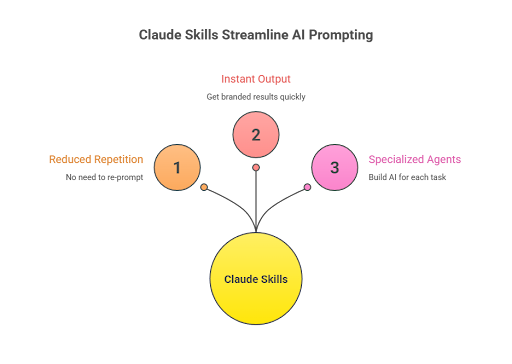
You taught Claude once how to do a task. You provide your instructions, reference documents, formatting rules, and brand guidelines. Claude saves all of that as a reusable “skill.” From that point forward, you just trigger the skill with your raw input material, and Claude handles the rest.
Think of it as building a specialized AI agent for each repetitive task in your business. Instead of spending weeks coding a custom solution, you build one in minutes through a conversation.
How Harold Built a Case Study Generator From Scratch
Let me walk you through exactly what happened.
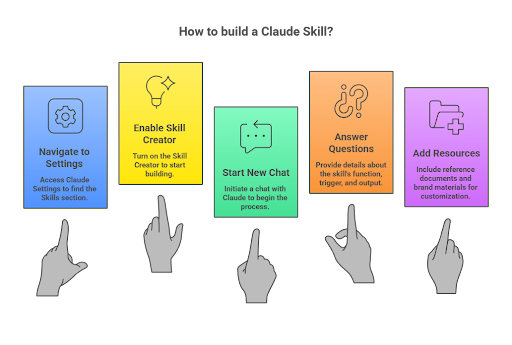
Harold opened Claude, went to Settings, then Capabilities, then scrolled down to Skills. The first thing you need to do is turn on the Skill Creator, which is a built-in skill that Claude already offers. Once that is activated, you are ready to build your own.
Harold started a new chat and typed: “Please help me build a skill.”
Claude asked three questions:
Question one: What should the skill enable Claude to do?
Harold answered: Creating case studies for our company.
Question two: When should it trigger?
This is important. You define the keywords that will activate the skill. So when someone types “create a case study” or similar phrases, Claude automatically knows to use this skill.
Question three: What is the expected output?
Harold specified: a Word document, an HTML file for web preview, and a presentation. All are capturing our brand identity.
Then Harold fed Claude three things: our case study prompt template, our Ideal Customer Profile (ICP) document, and a link to our website so Claude could capture our branding, colors, and visual identity.
A few minutes later, Claude had created the complete skill. It understood our voice, our content structure, and our visual formatting. Everything is packaged into a reusable agent.
The Real Test: One Transcript, Zero Instructions
Here is where it gets interesting.
Harold wanted to test whether the skill actually worked without any hand-holding. So he pasted a single call transcript, a recording of one of our project managers discussing a client engagement, into Claude. No additional instructions. No formatting guidance. No prompts beyond the raw transcript.
The result was remarkable.
Claude generated a complete case study with the correct meta title length (57 characters, right within our 50-60 character target), the proper meta description length (within our 150-160 character range), proper internal linking with anchor text, our brand formatting, and both an HTML preview and a Google Doc ready for review.
Before Skills, this process required someone to prepare all the documents, write out the detailed prompt, attach reference materials, and carefully check every output against our standards. Now, you paste a transcript and let the skill handle the rest.
This Goes Far Beyond Case Studies
Here is what I love about this. The case study generator is just one example.
Think about every repetitive content task in your business. Press releases. Social media posts. FAQ pages with schema markup. Email newsletters. LinkedIn articles. YouTube descriptions. Each one follows a specific format. Each one requires specific instructions. Each one eats up time when you have to explain the requirements from scratch.
Now imagine each of those tasks as a Claude Skill. Your team members can trigger any of them with raw input material and get back branded, formatted, specification-compliant output.
Harold put it well during our recording: “We can create these agents that work simultaneously.” That is exactly right. You are not building one assistant. You are building a team of specialized agents, each one trained on a specific task.

Why This Matters for Your Business
I have said it before, and I will keep saying it: AI is not about replacing people. It is about amplifying what people can do.
Harold started at Boulder SEO Marketing as our social media coordinator about 1.5 years ago. He understood how to leverage AI tools. He learned prompting. He thought outside the box. And now he leads our entire AI development effort.
That trajectory is available to anyone willing to learn. AI has leveled the playing field. If you understand these tools, you are in a fantastic position. It does not matter where you started. What matters is where you are going.
Claude Skills is another example of how technology keeps accelerating. What used to require custom development can now be built in a conversation. The barrier to creating sophisticated AI workflows is dropping to nearly zero.
How to Get Started Today
Step one: Open Claude and go to Settings, then Capabilities, then Skills.
Step two: Turn on the Skill Creator.
Step three: Start a new chat and type: “Please help me build a skill.”
Step four: Answer Claude’s three questions: what the skill does, when it should trigger, and what the output looks like.
Step five: Feed it your reference documents, templates, and brand materials.
The better your instructions and reference materials, the better your skills will perform. Prompting quality matters. But the beauty of Skills is that you invest that effort once, and it pays dividends every time you use it.
What We Are Building Next
At Boulder SEO Marketing, we are now building Skills for every major content workflow we run. Case studies, press releases, Friday SEO Tips, AI SEO Tips, client reporting summaries, FAQ schemas, and social media content. Each one becomes a specialized agent that any team member can trigger.
My goal is to build the most effective AI SEO agency possible. The technology exists. The tools are here. With team members like Harold who understand how to put them to work, I believe we are well on our way. If you want to learn more about what we are building, visit chrisraulf.com or boulderseomarketing.com.
Stay safe and healthy.
Cheers,
Chris