
If your AI impressions fell off a cliff this month, do you know which date it started?
That question sounds trivial. It is not. In August, two separate things happened inside Google, five days apart, and depending on which one hit you, the correct response is either to do nothing at all or to audit your site immediately. Opposite instructions. And right now I am watching people pick the wrong one.
Harold De Guzman, our AI Director, walks through both events in this week’s tip, and more importantly, the discipline that tells them apart. It takes five minutes and costs nothing. Watch the full video above to learn more.
Here is the thing about a brand new measurement tool. You have no baseline. No instinct for what normal looks like. So when the line moves, you have nothing to check it against. That is exactly the position most of us were in this month, and it is why so many people reached for the wrong explanation.
The Two Events, and Why Everyone Confused Them
Back in June, Harold covered the new Search Console report that finally separates your AI performance from your regular search performance. If you missed it, that episode is worth going back to, because everything here builds on it.
That report is genuinely useful. It is the first time you have been able to isolate how your pages perform inside Google’s AI answers, separately from your blue link results. For two years, those surfaces were a black box. Your content might have been feeding thousands of AI answers, or it might have been invisible, and you had no way to know which. So when it showed up in your account, most of us did the same thing. We opened it and stared at it.
Then, starting August thirteenth, that report started undercounting.
The natural reaction when a chart falls off a cliff is to ask what you broke. The answer was nothing. Google logged the problem on their own data anomalies page. A logging error caused a decrease in impressions on the Generative AI performance report, for data from August thirteenth through August seventeenth.
And then the line that actually matters, in Google’s own words: this issue affects data logging only.
That phrase is doing real work. It is Google’s way of saying the numbers are wrong, but the visibility is not. Your pages were being surfaced in AI answers at their normal rate. The counter simply failed to record a chunk of it.

Five days later, something completely different happened. On August eighteenth, Google released the August spam update. It applied globally, every language, every region. It finished on August twenty-first, after two days and sixteen hours. That is Google’s third spam update of the year.
Unlike the logging bug, this one was a real ranking event. No blog post came with it, no list of what it targeted. No new policies announced. Just a dashboard note and a rollout.
Two events. Same tool, same chart, same week. One is a reporting defect where the right move is to do nothing. One is a ranking event where the right move is to audit. Because they landed so close together, almost everyone filed them under one explanation.
There is a reason this confusion was so easy to fall into. Both events showed up in the same place. If you were watching that report through August, you saw one continuous line, and somewhere in the middle of it two entirely unrelated things happened. Nothing on the chart tells you where one ended and the other began. Google does not annotate your data for you. The only marker you get is the date.
That is why I keep pushing the anomalies page. It is the closest thing we have to a changelog for our own measurement.
Both Ways of Getting This Wrong Are Expensive
Let me spell out both wrong turns, because they cost differently, but they both cost.
Wrong turn one. You see the August thirteenth drop and decide the spam update hit you. So you rewrite content. You prune pages. You disavow links. You spend two weeks and real money fixing a problem that was never on your site.
Wrong turn two, and this one is worse. You read that the drop was a known bug, feel relieved, and stop looking. Meanwhile, a genuine ranking event rolled through five days later, and you never went back to check.
The bug window closed on the seventeenth. The spam update started on the eighteenth. Those are different problems with different answers, and the only thing separating them in your data is the date the movement began.
Four Things That Report Still Will Not Tell You
Now set both events aside for a moment, because there is a bigger point underneath them.
That AI report is the best window you have ever had into Google’s AI answers. And there are still four things it will not tell you.
Number one. It shows impressions. That is it.
Number two. No clicks. So you cannot tell what any of that visibility actually earned you.
Number three. No queries. It will not name a single question that produced those impressions.
Number four, and this is the one that hits agencies hardest. It is not exposed through the Search Console API. You cannot pull it into a dashboard. You export it by hand, or you do not export it at all.

Impressions only. No clicks. No queries. No automation. And now we know it can quietly undercount for five days, and you find out from a help page.
Every one of those is something you would take for granted in any other report you open on a Monday morning. In my experience, the gap between what a tool feels like it is telling you and what it is actually telling you is where most bad decisions get made.
One more thing worth knowing about that report, since we are on the subject of what it does not tell you. It combines AI Overviews and AI Mode into a single number, with no dimension separating them. So when an impression lands, you cannot tell which of the two surfaces produced it. Search Labs experiments are excluded entirely, which means whatever Google is currently testing on your audience does not appear at all.
None of that makes the report useless. It makes it a partial view, and partial views are fine as long as you know which parts are missing before you build a client report.
The Habit That Costs You Ten Seconds
None of that means ignore the report. It means know what it is. A partial signal, read with a habit around it, beats a complete signal you never check.
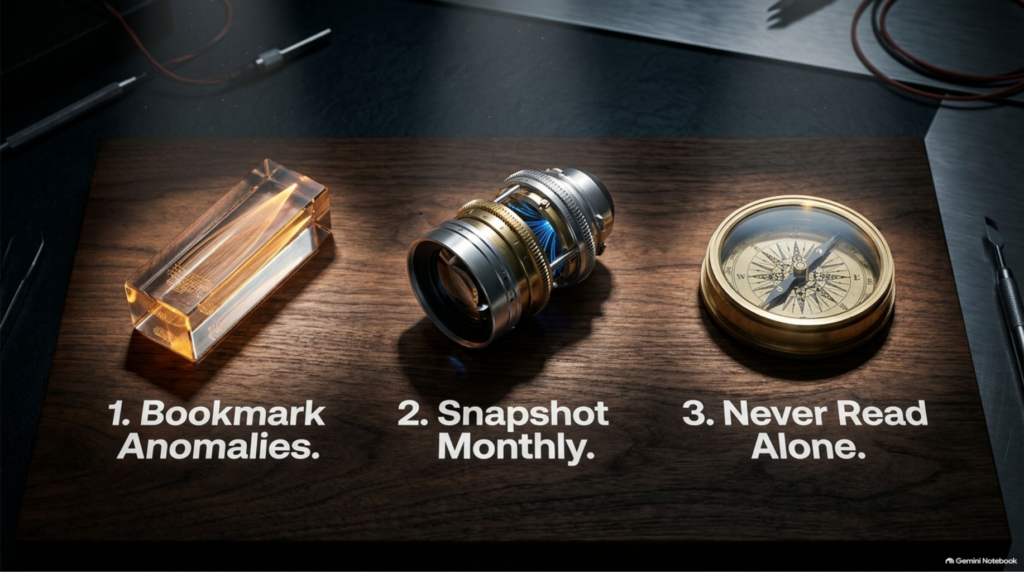
So here is the habit. Three things. All free. All take minutes.
One. Bookmark Google’s data anomalies page. It is public, it lives in Search Console Help, and it lists every known reporting defect from the last several months: Search Console, Discover, the AI report, all of it. Before you react to any move in your data, check that page first. Almost nobody in our industry has it bookmarked, and it takes ten seconds.
Two. Snapshot your ranges. That report has no API, which means when the data is wrong, you have no archive of what it said before. So export by hand, monthly. It is boring. Do it anyway. There is no way to go back and get a baseline you did not save.
Three. Never read that report alone. Pair it with your analytics and your actual leads.
What Triangulation Actually Looks Like
Triangulation sounds like a big word for something that takes about five minutes, so let me make it concrete.
You open the AI report, and the line drops sharply. Now open your analytics for the same dates. Did your organic traffic move too? Then open your inbox, or your CRM, or whatever holds your inquiries. Are you getting fewer of them?
If all three moved together, something real happened, and you go to work.
If only the report moved and the other two are flat, you are looking at a reporting problem, not a business problem.
That is the test: three tabs, same date range.
You can absolutely do all of this by hand. Checking the anomalies page, exporting your ranges, cross-referencing three sources every month. That is genuinely how we started. Or, if you would rather that monitoring just ran on its own, that is exactly what we built microSEO.ai for, formerly BSM Copilot. Either way, the discipline is the same. The tool does not replace the thinking.
I want to be careful here because there is a version of this that can lead to paralysis. Before a number changes what you do, spend 60 seconds confirming the number is real. That is a low bar, and almost nobody clears it.
What This Month Actually Taught Me
Here is what I keep coming back to.
We spent two years asking Google for visibility into AI answers. We got it in June. And by August, we had already started treating it as solid as the click data we have been reading for years.
It is not. Not yet. And that is fine, as long as you hold it that way on purpose.
I have been doing this since before Google was called Google, and every measurement tool I have worked with has gone through this phase. The instrument arrives, everyone treats it as gospel, then everyone learns where it lies. What is different now is the speed. We are making decisions on measurement that is younger than most of our client contracts.
The move is not to distrust the tool. The move is to stop letting a single number decide what you do next.
Check the date. Check the anomalies page. Check it against something real. Then act.
One more thing. Every time a measurement gap appears, a dozen products arrive promising to fill it. But no third party has access to data Google is not publishing. If Google is not exposing queries for AI surfaces, nobody else has them either, no matter what the marketing page says. Be skeptical of anyone selling certainty about a surface Google itself describes in impressions only.
Speaking of Checking It Against Something Real
This whole episode is an argument for not trusting a single number and for finding better evidence before you act. So the timing on this is good.
The next AI SEO & GEO Online Summit is Wednesday, October 7, 2026, from 9:00 to 11:00 AM Mountain, and it is free. Two hours, five speakers, no pitch. I host it under my own name rather than the agency’s, precisely so nobody has to sit through a sales deck.

What makes this one relevant to everything above is that two of the sessions are original research rather than opinion. SE Ranking is presenting their own study on how AI search actually behaves. Duda is walking through their landmark AEO study, which analyzed nearly 860,000 websites and 68 million AI crawler visits in a single month, and found that sites AI crawlers visit pull 3.2 times more human traffic and 2.7 times more form submissions than the sites they skip.
That is the kind of thing I mean by checking it against something real. Your Search Console report tells you your impressions. It cannot tell you what AI crawler behavior predicts about your actual pipeline. Somebody had to go and measure 860,000 sites to answer that.
Boulder SEO Marketing rounds out the lineup, and every session has a moderated Q&A so you can ask the researchers directly. Sessions are recorded and sent to everyone who registers, so sign up even if the time zone does not work for you.
What to Do Next
If your numbers moved this month and you are still not sure which of the two things caused it, that is a twenty-minute conversation, not a project.
Open your Generative AI report today and find the exact date your line started moving. If it began on the thirteenth and recovered around the eighteenth, that is Google’s logging error, and there is nothing to fix. If it began on the eighteenth and kept going, that is the spam update, and it deserves a proper audit.
Then bookmark the anomalies page. This will happen again.
If you want a hand reading your own drop, reach out. If you want an honest look at where you stand first, take the complimentary AI SEO audit. And I hope to see you on October seventh.
Every episode in this series lives on the AI SEO Tips page if you want to work through the archive.
Stay safe and healthy.
Cheers,
Chris